Dial Your Course
Course Design · Case study
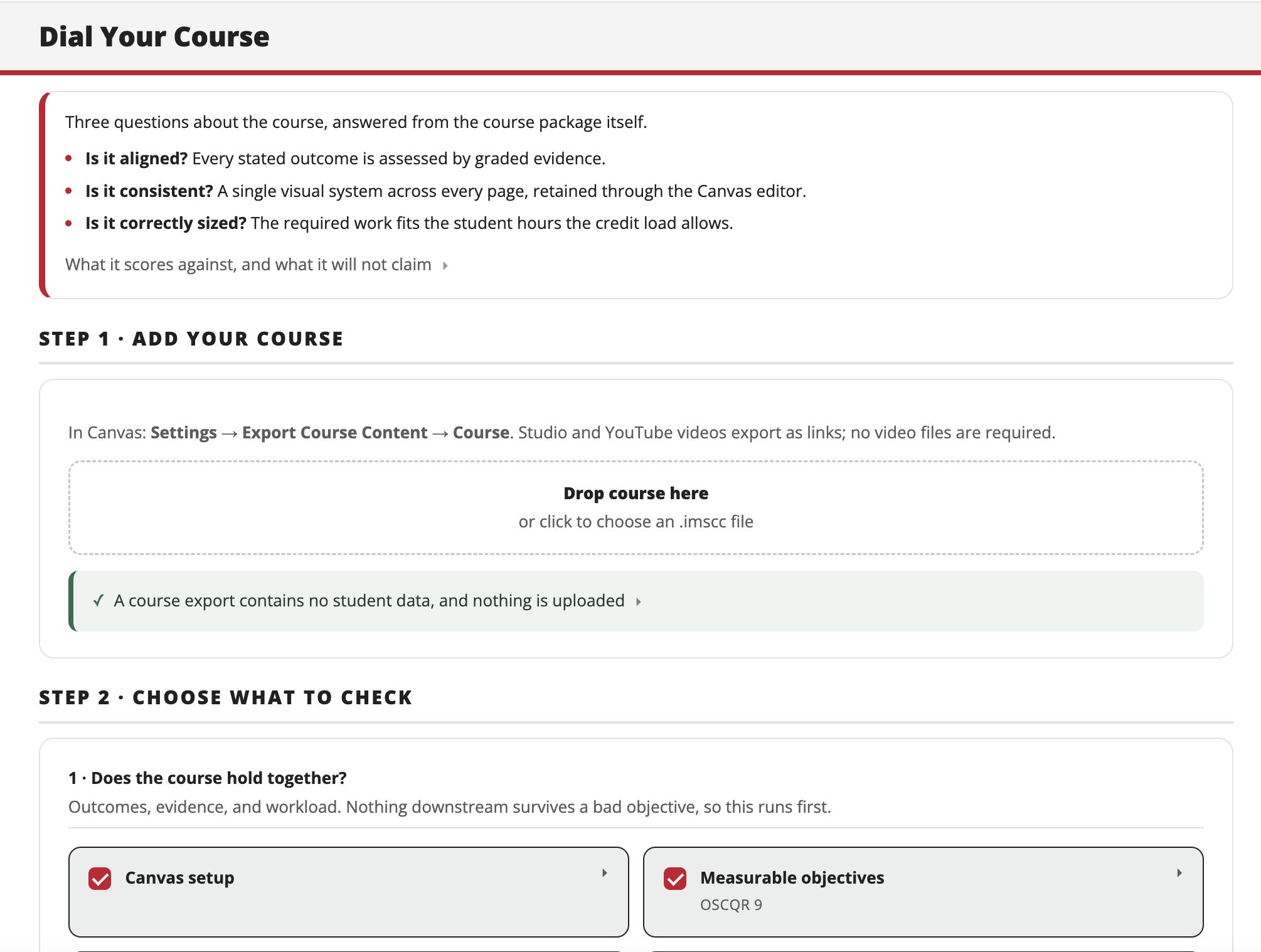
Drop a Canvas course in. Nineteen checks run against it: seat hours, outcome alignment, accessibility, AI resistance. Approve the fixes, get the course back.
Goal
This started with a simple question: how does an online course show it delivers the student hours a credit promises? A credit carries a set number of student hours, and the syllabus commits to them. Online, that evidence lives in the course package itself, so a clean, consistent way to check it helps.
Course review is usually done by reading, one course at a time, against a rubric written for reviewers rather than for the person doing the work. Dial Your Course checks the countable things in a single, consistent pass and hands the course back with fixes ready to approve.
Audience
Faculty and instructional designers preparing an online course for launch or review. No technical background assumed.
Formal review comes once a year, and for most faculty it is the first time anyone reads their course closely. This is a rehearsal for that review, not a replacement for it. It reports to you and nobody else. Nothing is submitted, scored, or sent to an administrator.
Process
Export the course from Canvas, drop the file in, choose the checks. Every finding names the standard it comes from and where in the course to fix it. Approve the changes you want, and the tool writes them back and hands you a package ready to reimport, plus a short list of the few things only Canvas itself can do.
It reports only what it can prove. A check that cannot be computed is never reported as a pass, and nothing changes without your approval.
Technology
- A browser-based tool: vanilla JavaScript, no backend, no account, no database.
- Reads a Canvas Common Cartridge (.imscc) export and writes a corrected package back, entirely on your own device.
- The nineteen checks are deterministic rules, not AI, so the same course returns the same answer every time. Your course is never sent to any AI to be read, stored, or used for training.
- Optional AI is a future feature only, for the authentic-assessment module. It is opt-in, works from aggregate course information, and is designed to run solely through the institution’s sanctioned AI, for example a district Google agreement under which institutional content is not retained or used to train the model.
- Hosted on GitHub Pages.
Outcomes
Version 1 is in use in the Digital Media Arts program. Version 2, which adds model-assisted review of graded work, is in development, with faculty testing next.
The tool catches the small, easy-to-miss things before a formal review does: a missing alt attribute, an outcome not yet attached to a rubric, a module whose hours could be brought back in line with the credit. It carries the countable part of a peer and lead reviewer’s Quality Matters and OSCQR practice into software while leaving the judgment calls to the person.
Independently developed and owned by Michelle Blomberg. It applies the SUNY OSCQR rubric under a Creative Commons license, alongside alignment and workload criteria of its own, and is not affiliated with or endorsed by SUNY. Questions? Drop me a note.